Independent Guide: Not affiliated with SOOP (sooplive.co.kr / formerly AfreecaTV) or SOOP Co., Ltd. (주식회사 숲). No stream ripper hosted — Editorial Policy · 한국어 안내
SOOP (숲 · Formerly AfreecaTV) Technical Reference

SOOP & AfreecaTV Recorder, VOD & Archive Options

South Korea's flagship live platform SOOP (sooplive.co.kr / sooplive.com, rebranded from AfreecaTV in October 2024) restricts native VOD file downloads to the broadcasting streamer and accounts granted channel VOD / downloader permissions—and effective June 1, 2026, Standard Streamer replays expire after 90 days (or 1 year at ≥50 pure VOD views). Compare compliant ways to watch replays, record your own broadcasts in FreecShot Plus or OBS Studio, or handle authorized editor workflows.

What this site is: An independent technical handbook. We do not host URL rippers, accept channel links, or bypass subscriber (구독) or 19+ verification gates.

Start With Your Role on SOOP

What SOOP permits—and which native tools unlock—depends on whether you are watching, broadcasting, or editing for a channel.

For Viewers

Watch VODs, Clips & Catch

Stream published VOD Replays (다시보기) on web or mobile Multi-View, and create official User Clips (유저클립) or Catch (캐치, ≤60s) when enabled.

  • June 1, 2026 retention: 90d / 1yr Standard, 2yr Best
  • Clips, Catch & Uploaded VODs are exempt from purge
VOD Retention & Clip Guide →
For Streamers (BJs)

Archive Your Broadcasts

Save high-quality local masters while live via FreecShot Plus (프릭샷 플러스) or OBS Studio, or download stored channel VODs on PC before expiration.

  • Multi-track audio isolates Star Balloon alerts & BGM
  • PC player 더보기(⋯) download before 90d/2yr cutoff
FreecShot Plus & OBS Setup →
Channel Permission / Consent

Authorized Editor Workflows

Request channel VOD / downloader permission to save platform-stored VOD files on PC without re-recording the screen, or configure consent-approved OBS capture.

  • Avoids browser screen-capture frame drops & banners
  • Clear 같이보기 watch-party & BGM rights separately
Official VOD Permission Guide →

Interactive SOOP Recording & VOD Setup Assistant

Select your role, goal, operating system, and media needs for a tailored SOOP (formerly AfreecaTV) workflow, June 2026 retention check, and pre-flight checklist.

4 adaptive questions active
1 Your Role on SOOP
2 What You Want to Do
3 Operating System
4 Media Requirements
Recommended · Immune to June 2026 Expiry Streamer · Windows · Live Archive · Video + Audio

Simultaneous Local Broadcast Recording (FreecShot Plus or OBS Studio)

Recording locally while broadcasting to SOOP (sooplive.co.kr) saves a high-quality local master immediately—protecting Standard and Best Streamers from SOOP's June 1, 2026 90-day / 1-year / 2-year VOD expiration limits and avoiding screen re-capture artifacts.

Windows Streamer Configuration (Video + Audio)

  • Choose FreecShot Plus or OBS Studio (Windows): SOOP ended feature updates to legacy FreecShot and recommends FreecShot Plus (프릭샷 플러스)—open Settings (⚙) → Recording (설정 → 녹화), confirm your desired recording format/path in your installed build, and click bottom-right REC (녹화). Or stream via OBS Studio (dashboard.sooplive.com → 외부장치 방송 설정, standard 1080p60 ≤ 8,000 kbps CBR, 2s keyframe) using (Use stream encoder) or dedicated NVENC (CQP 18–21) / Intel QSV (ICQ 18–22) / AMD AMF (CQP 18–21).
  • Multi-Track Stem Separation & Track-1 Mute Rule: Both FreecShot Plus (Settings → Recording → Advanced → Audio Tracks 1–6) and OBS Studio (Advanced Audio Properties) let you keep Track 1 as the full live mix while isolating Mic (Track 2), Game/BGM (Track 3), and Star Balloon alerts (Track 4). Crucial when editing: mute or exclude Track 1 on your NLE timeline when mixing Tracks 2–4.
  • Long-Term Storage Hygiene: Local recordings stay on your own drive independent of SOOP view-count thresholds (back up important masters to a second SSD or cloud storage).
Pre-Flight Recording Checklist
0 of 4 checked

Simulcasting or hitting dropped frames? Check SOOP Capture & Sync Troubleshooting →

Compare SOOP (Formerly AfreecaTV) Recording & VOD Methods

Why legacy afreecatv.com tutorials break—and how SOOP's official tools, June 2026 retention tiers, and local encoders compare.

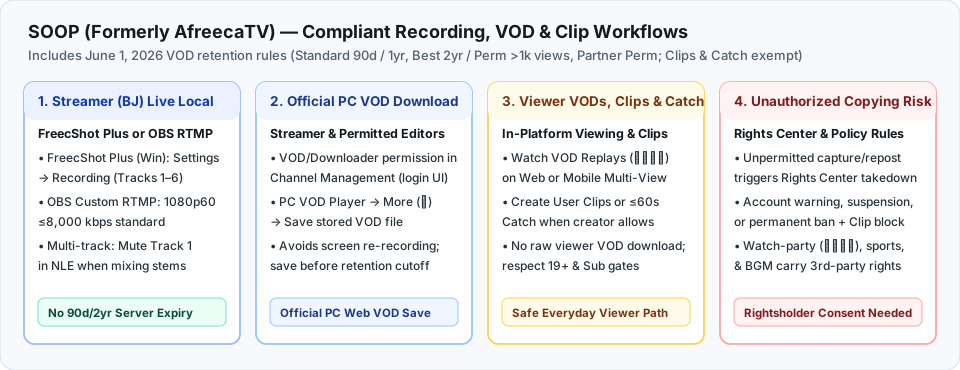
Decision map comparing four SOOP workflows: Streamer local recording in FreecShot Plus or OBS, Broadcaster and Permitted Editor PC VOD downloads, Official Viewer VODs/Clips/Catch under June 2026 retention rules, and Rights Center enforcement for unauthorized copying.
Figure 1: Official SOOP recording, replay, and permitted-editor paths following the October 2024 AfreecaTV→SOOP rebrand and June 1, 2026 VOD retention overhaul.

← Swipe table horizontally on mobile to compare all columns →

Workflow Who Can Use It Quality & Audio Stems Retention / Policy Limit
OBS Studio Simultaneous Recording
(외부장치 방송 설정)
Streamers (Windows & macOS) High-quality local CQP/ICQ master + up to 6 separated audio tracks (.mkv or Hybrid MP4/MOV) Kept on your own drive; immune to SOOP's June 2026 90d / 2yr VOD purge
FreecShot Plus Built-In [REC]
(프릭샷 플러스 · legacy FreecShot EOL)
Streamers (Windows only) Integrated SOOP studio recording; supports audio tracks 1–6 under Settings → Recording → Advanced Local disk storage; legacy FreecShot feature updates ended (SOOP recommends FreecShot Plus)
Official PC VOD Player Save
(더보기 ⋯ / Channel VOD Permission)
Broadcasting Streamer & Authorized Channel Editors (PC Web) Platform-stored VOD file (avoids screen re-recording, not a lossless camera master) Must download before June 1, 2026 tier cutoff (Standard 90d / 1yr, Best 2yr / Perm >1k views)
Official VODs, User Clips & Catch
(다시보기 · 유저클립 · 캐치)
All Viewers (Web, Android, iOS, ONE store) Streaming playback; in-platform User Clips & short-form Catch (≤60s) In-platform viewing/clipping only (no raw viewer VOD download); Clips & Catch exempt from June 2026 purge
Authorized OBS Browser Capture
(WGC / ScreenCaptureKit)
Editors with explicit streamer consent Clean browser window + isolated 48 kHz app audio Public broadcasts with consent only; does not clear 같이보기 watch-parties, sports, or BGM